JustForex
Loading recent posts...

Aug 11, 2011

Scrambled Egg 0.4

Despite its suggestive name, judging solely by its moniker Scrambled Eggs is not evident of its purpose. The Internet does not run short of solutions, both paid and freebies, when it comes to sending off encrypted messages. This application, however, falls into the second category and has been designed to help you encode text messages simply and effortlessly. 

No installation is needed to run the program and start encrypting your messages. The interface is available as soon as you unpack and double click the executable file in Scrambled Egg’s folder.

Looks are far from impressive, but the layout is easy to understand and all options are handled without difficulty. However, if you have any problems working with it you can access the help screen which explains the three simple steps you have to follow in order to encode the data.

The interface sports two panels, one for typing the text you want to encrypt and the other to revert the process and turning the “random” characters into an intelligible message.

You can use binary files as input data as well as plain or formatted text. Scrambled Egg turns your message into an undecipherable string of characters in three steps: pre-encryption, encryption and post-encryption.

In the first stage, which is optional, just like the second one, the data gets compressed using ZLIB, BZ2 or ROT13 algorithms.

The real encryption, which also requires you to set a password, occurs in the second step of the encoding process. The possibilities in this case are wider and include AES, Blowfish, ARC2, CAST, DES3 and RSA. For the latter, you have to punch in the path to the public or private RSA key.

Encoding the data represents the third and final step of the process. Unlike the previous two this is compulsory and comes with the following codecs: Base64, Base32, HEX, Quopri, String Escape, UU, Json and XML.

All the encoding is done as you type the text and you do not have to follow a particular order to get your text all scrambled up. The flexibility of the application lets you select the encryption algorithms whenever you want, even after the text string has been entered.

Also, you’ll notice the result of your choices in the decrypt section of the interface. So if anything looks familiar to the original text, which is actually impossible, you can switch to a different encryption method.

Once all the settings have been applied you can proceed to exporting the file. It will be saved as PNG, XML, Json or with no extension at all, but opening it will not help you catch a glimpse of the message.

Reverse engineering the encrypted message is no tough thing if you know the password. Scrambled Egg automatically detects the algorithms used to wrap the text up into an unrecognizable form and all you have to do is input the password to reveal the message.

On the downside, if you choose String Escape or Quopri as codecs the resulting file will have no extension. In this case the decryption process is slightly tougher because the application no longer detects the algorithms automatically, leaving the fields blank. On top of this, you have to input the right password to read the message.

In the lower part of the program screen the application shows the amount of characters in both the encrypted piece and in the decrypted one.

If you want to encrypt formatted text Scrambled Egg offers this possibility in the lower part of the screen. Just check the appropriate box before scrambling it so that the properties are preserved upon reverse engineering.

The text field acts just like a basic text editor, offering only the most rudimentary options. It cannot be used to format the text, so it has to be prepared in advance and pasted in for everything to work out fine. However, you will be able to select characters, undo modifications, cut, copy paste and delete.

Scrambled Egg makes for an extremely simple text encryption utility. It has its flaws and can be developed into a more feature-rich program, but in its current form it manages to deliver exactly what the developer intended: a free and uncomplicated way to encrypt and decrypt messages.

Encrypt your message with ease
Easily encrypt your messages using AES, ARC2, Blowfish, CAST, or DES3, then encode the result in a printable form, using Base64, Base32, HEX, Quopri, string escape, UU, or XML.

The resulted string can be sent on e-mail as text, saved as XML or UU, or can be transformed into a little PNG image.

The password is not stored inside the message. It's impossible for someone to decrypt the message, unless it knows, or guesses your password.

Get Scrambled Egg and give it a try to see how useful it can be for encrypting your information!

What's New in This Release:
  • password enhancement. The key is derived from original password (using PBKDF2) making the encryption much stronger, even with short passwords;
  • added Json encoding and RSA encryption;
  • few bug fixes and a lot of GUI improvements, including drag & drop text in the left area, a HELP button, etc;
  • There are a lot of improvements, but backwards incompatible, that means you cannot decrypt text encrypted with Scrambled-Egg version 0.3.
Download here


The Complete Apple iPhone 5 Rumored Images And Video Roundup

Apple iPhone 5 would be the most eagerly awaited gadget of this year, with an expected announcement and public availability in September/October this year here is an complete rumor roundup (images and video) of the yet to be announced device.


Rumored New iPhone 5 Image Concepts


A Summary Video Of All The Rumored Expected New Changes In iPhone 5


Credits : MacRunors.com & nowhereelse.fr

Network Security Toolkit (NST) 2.15.0 Is Based on Fedora 15

Network Security Toolkit (NST) 2.15.0 has been released. The latest update is based on Fedora 15 and brings all of the changes and new packages included in the latest Fedora release, including Gnome 3.0.

NST is a Linux distro aimed at security experts and network admins and offers a huge variety of tools aimed monitoring and diagnosing network issues as well as testing for common security flaws and weaknesses. 

"We are pleased to announce the latest NST release: 'v2.15.0.' This release is based on Fedora 15 using Linux Kernel: '2.6.40-4.fc15 - Rebased from latest Linux Kernel: 3.0'," an announcement on the project's homepage read.

The latest NST update comes with the recently launched Linux kernel 3.0, which has been 'reversioned' as Linux kernel 2.6.40 in Fedora 15 for compatibility reasons. For all intents and purposes, though, it's the very latest kernel update.

On top of its Fedora 15 roots, NST 2.15.0 comes with plenty of changes and updates of its own.

There is a new Network Interface Bandwidth Monitor app, included in the NST WUI, built with SVJ/AJAX. This makes it possible to monitor network bandwidth though the web user interface. 

The Open Vulnerability Assessment Scanner (OpenVAS) and Greenbone Security tools are now available for NST users and have also been integrated into the web UI. 

The aforementioned web UI has also been updated and enhanced. All packages have been updated to their latest versions.

The THC IPv6 Attack Toolkit is included in NST now as well and available for install. 

With Fedora 15 switching to the GNOME 3.0 desktop, one of the first major distros to do so, NST tools have also been updated to support the new desktop environment.

The custom NST services have been updated and changed to support systemd, the new default Linux init daemon in Fedora 15.

NST also supports the new Fedora Network Device Naming convention. For example eth0 becomes p2p1 or em1.

A bootable ISO live CD and it's based on Fedora.

Network Security Toolkit is a bootable ISO live CD and it's based on Fedora Linux.

The toolkit was designed to provide easy access to best-of-breed Open Source Network Security Applications and should run on most x86 platforms.

The main intent of developing this toolkit was to provide the network security administrator with a comprehensive set of Open Source Network Security Tools. The majority of tools published in the article: Top 75 Security Tools by insecure.org are available in the toolkit.

What we find rather fascinating with NST is that we can transform most x86 systems (Pentium II and above) into a system designed for network traffic analysis, intrusion detection, network packet generation, wireless network monitoring, a virtual system service server, or a sophisticated network/host scanner.

This can all be done without disturbing or modifying any underlying sub-system disk. NST can be up and running on a typical x86 notebook in less than a minute by just rebooting with the NST ISO CD. The notebook's hard disk will not be altered in any way.

NST also makes an excellent tool to help one with all sorts of crash recovery troubleshooting scenarios and situations.

What's New in This Release:
  • The entire NST distribution is RPM based and an NST system can be maintained using reduntant RPM repositories.
  • NST is now extensible. Add new applications with YUM install.
  • "NST Live" allows for read/write rootfs file system access so that new applications can be installed even though it was booted from a DVD device.
  • "NST Live" can be installed to a USB device for creation of a "NST Live USB Disk". One can then boot the "NST Live USB Disk" from a system capable of booting from USB devices.
  • An "NST Live USB Disk" may contain data persistence allowing session information to be maintained across system reboots and/or system moves.
  • For systems that lack a DVD device or can not boot from USB devices, the following solution was created for installation of NST to the system hard disk. The "NST Live" distribution is too big to fit on a CD. An "NST Minimal" ISO is provided and was designed to fit on CD media. One can boot the "NST Minimal" ISO, perform a hard disk installation using the NST script: "nstliveinst" and then YUM install the "nst-live" RPM package to completely build out the full NST distribution.
  • A new NST script: "nsttraceroute" has been created that Geocodes output from the traceroute utility in KML format for rendering with Google Earth.
  • Added 2 network content capture applications: "driftnet" and "tcpxtract". Driftnet is used to capture and display graphic images (i.e., GIF, JPEG and PNG). TCPxTract is used to capture complete documents including PDF or Microsoft Word docs.
  • The Multi-Tap Network Packet Capture page has been enhanced with the integration of ngrep and dsniff.
  • Many new applications have been added to this distribution release. Previous existing networking and security applications have been updated to their latest revision.

Network Security Toolkit (NST) 2.15.0 is available for download here

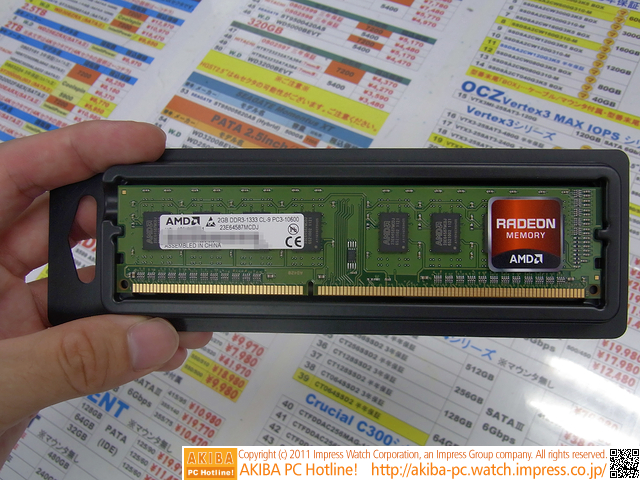
AMD DDR3 Radeon RAM Are Just a Test


When Advanced Micro Devices was found to have developed branded random access memory, questions immediately arose on whether it had serious intentions, and the answer might have come at last.

Advanced Micro Devices used to be known for its x86 central processing units, until it bought ATI and also became a power on the graphics market.

The Sunnyvale, California-based company proceeded to refining its various products and even combined CPUs with GPUs, creating the Fusion chips, although, admittedly, bringing them to market took quite a few years.

In the meanwhile, it has maintained a comparatively small DRAM business on the side, one that never really got any attention, until recently that is.

AMD has been supplying its add-in-board partners with GDDR5 memory chips for years, but some days ago, some Radeon modules were discovered that used DDR3 memory.

Now, it looks like the outfit may have explained its official stance on the matter, at least according to newer reports.

Basically, the RAM modules were just a test of opportunity to see if there were any regions that could produce profits should AMD start selling RAM there.

It is unclear if the ultimate decision will be favorable, given the way DRAM prices have been falling for so many months and, thus, those very profits will be hard to gather, especially since the memory is low end.

"AMD does not manufacture memory and does not plan to sell system memory directly to our customers. AMD is currently determining if the sale of AMD Radeon-branded memory through channel partners is a viable opportunity and as such it has appeared in some regions for purchase through retail," said Dave Erskine, a spokesman for AMD.

In the future, Advanced Micro Devices could establish a program to supply Fusion-based systems with own-brand RAM, but the ultimate decision lies with PC makers who probably won't be very inclined to do something like this right off the bat.


Aug 10, 2011

Download IE 9.0.2 for Windows 7 SP1 and Earlier – Patch Critical Vulnerabilities

Internet Explorer 9 has been pushed first to version 9.0.1 a couple of months ago, and now to v9.0.2 by two update packages released by Microsoft. 

IE 9.0.2 is currently available through Windows Update as the August 2011 Cumulative Security Update for Internet Explorer, and IE 9.0.1 was also served automatically to users through WU as the June 2011 Cumulative Security Update for Internet Explorer. 

Essentially, IE 9.0.2, as v9.0.1 before it, is nothing more than the result of the integration of a range of patches designed to fix security vulnerabilities affecting the browser. The version change reflects the fact that a number of security holes have been plugged. 

No less than seven security vulnerabilities have been resolved by the patches packed inside the August 2011 Cumulative Security Update for IE. 

“This security update resolves five vulnerabilities in Internet Explorer that were disclosed in coordination with Microsoft and two publicly disclosed vulnerabilities,” revealed Tyson Storey, Program Manager, Internet Explorer. 

“The most severe vulnerabilities could allow remote code execution if a user visits a malicious, specially crafted Web page using IE. Users who run without administrative rights are more secure in general and should be less impacted than other users (…).

Microsoft has slapped a severity rating of Critical for the August 2011 Cumulative Security Update for IE6, IE7, IE8, and IE9. 

Obviously, only customers running Windows 7 SP1, Windows 7 RTM and Windows Vista SP2, as well as their server equivalents, will be able to update to IE 9.0.2. 

Customers running Internet Explorer 9 on top of Windows 7 need to know that only two of the vulnerabilities affecting their flavor of the browser are rated Critical, namely XSLT Memory Corruption Vulnerability - CVE-2011-1963, and Style Object Memory Corruption Vulnerability - CVE-2011-1964. 

Another two vulnerabilities are rated Important and the remaining two just Moderate, with one of the IE security holes not affecting IE9 at all. 

The Redmond company has labeled the August 2011 Cumulative Security Update for IE6, IE7, IE8, and IE9 as a priority in terms of deployment, and Microsoft advices customers to deploy the patches as soon as possible. 

At the time of this article, no attacks targeting the IE vulnerabilities patched in August 2011 had been detected. Nonetheless, now that the patches are out there’s always an increase in risk associated with attackers reverse engineering the security updates and producing working exploits that can be used in attacks. 

Internet Explorer Platform Preview 2 10.0.1008.16421 is available for download here.

Windows Internet Explorer 9 RTW for Windows 7 and Windows 7 SP1 is available for download below:


Nearly-Universal Cure for Viral Infections Developed

For many decades, doctors have been using antibiotics to kill off infecting bacteria. However, the field of medicine has been lacking a similarly-effective tool for fighting viral infections. Now, MIT experts propose a new type of drug that does just that. 

Viral agents are responsible for triggering a host of unpleasant and potentially-lethal medical conditions, such as for example influenza, the common cold, hemorrhagic fevers, Ebola and even certain forms of cancer. 

Fighting these viruses is proving to be extremely difficult, and doctors have been complaining about the fact that they don't have access to any potent drugs capable of fighting back for many years. 

Now, investigators at the MIT Lincoln Laboratory say they managed to synthesize a new drug that has a nearly-universal effect on cells in the human body that have been infected. The compound is literally able to identify only diseased cells, and give them to order to shut down.

The most remarkable thing about this drug is that it works selectively, in the sense that it doesn't do significant damage to healthy tissue around the infected cells. Details of the study appear in the July 27 issue of the peer-reviewed scientific journal PLoS One.

During early experiments conducted at MIT, researchers found the drug to be effective against an array of no less than 15 selected viruses, including rhinoviruses that cause the common cold, H1N1 influenza, a stomach virus, a polio virus, dengue fever and several other types of hemorrhagic fever.

“In theory, it should work against all viruses,” Lincoln Laboratory’s Chemical, Biological, and Nanoscale Technologies Group senior staff scientist Todd Rider explains. He was the expert who invented the new technology.

Rider says that the approach functions in a fairly straightforward manner – the drug is designed to track down the chemical signature of a very specific type of ribonucleic acid (RNA), which is only produced in cells that have been infected by viral agents. 

Because this chemical is not produce in any healthy tissue, there is no risk of the compound affecting healthy cells in the body. What this means is that – once the technology is perfected – it could have very few or no side-effects.

Infectious agents such as the 2003 Severe Acute Respiratory Syndrome (SARS) could also be counteracted using the new, broad-spectrum approach, Rider explains. He conducted the work with MIT experts Scott Wick, Christina Zook, Tara Boettcher, Jennifer Pancoast and Benjamin Zusman.

The work was funded by the National Institute of Allergy and Infectious Diseases and the New England Regional Center of Excellence for Biodefense and Emerging Infectious Diseases.

Previous funding was secured from the Defense Advanced Research Projects Agency (DARPA), Defense Threat Reduction Agency and the Assistant Secretary of Defense for Research and Engineering.


Intel Confirms Ivy Bridge CPUs Will Feature Enhanced Quick Video Capabilities

Intel has just confirmed that its next-generation Ivy Bridge processors will feature an enhanced version of the Quick Sync technology introduced with its current second generation Core chips, which, among other features, will enable on-the-fly encoding for HD video conferencing.

Intel will talk about these new capabilities in a technical session entitled “Media innovations in the Intel microarchitecture codenamed Ivy Bridge,” that will be held during the 2011 Fall IDF.

“In this session, you will hear about the media innovations (feature, performance and quality) in the new Intel Microarchitecture Codename Ivy Bridge. These innovations continue to improve the user experience on client PC platforms and enable exciting new applications. 

“You will also hear from Intel and Microsoft experts on the details on how to build end to end high definition video conferencing solutions that will be brought to main stream by the Intel Quick Sync Video technology in Ivy Bridge,” reads the session's descriptions as posted on the Intel IDF website.

Ivy Bridge is the code name used for the 22nm die shrink of the current Sandy Bridge chips and features basically the same architecture, but with a few minor tweaks and improvements.

This includes a new on-die GPU that will come with full DirectX 11 support as well as with 30% more EUs than Sandy Bridge, in order to offer improved performance.

In addition, the processor cores have also received some minor tweaks as their AVX performance was slightly increased and Intel has updated the integrated PCI Express controller to the 3.0 standard.

The move will benefit multi-GPU systems as well as users who use high-performance PCI Express SSDs and other such devices that require high data bandwidth.

The rest of the changes brought with Ivy Bridge come from the new 7-series Panther Point chipsets, which pack native USB 3.0 support.

Gigabyte Prepares LGA 2011 Motherboard with 8 DIMM Slots


Even though there is still quite some time left until Intel officially releases the X79 chipset for Sandy Bridge-E processors, a new picture of an upcoming Gigabyte LGA 2011 motherboard featuring eight DIMM sockets has recently hit the Web.

This is most certainly not going to be Gigabyte's most advanced board based on the X79 chipset, but it gives us a pretty good idea on what we can expect from future LGA 2011 workstation motherboards.

The first thing that one notices when taking a look at the GA-6PXSV is the fact that the board comes equipped with no less than eight DIMM memory sockets, which enable up to 64GB of system memory to be installed in a quad-channel configuration.

Right to the left of these, Gigabyte has placed the board's expansion slots, which include a pair of PCI Express x16 slots, one PCIe x8 slot, one PCI Express x4 slot as well as a legacy 32-bit PCI slot. Both the x8 and x4 PCIe slots are open ended.

Storage is provided by no less than six 6Gbps SATA ports, driven by the X79 PCH, and the GA-6PXSV also features two SAS 6Gbps ports placed right near the board's left margin.

Other features include USB 3.0 connectivity, support for the enterprise version of Intel's Rapid Storage Technology (IRST), and a six-phase CPU PWM with DrMOS MOSFET transistors. 

On the back of the GA-6PXSV, outside of the regular connectors, users will also find a pair of KVM network ports.

Intel's Sandy Bridge-E processors are expected to debut in the forth quarter of 2011 and the initial CPU batch will include three chips, two featuring a six-core design and a quad-core model. The Gigabyte GA-6PXSV is also expected to debut in Q4 2011. (via XtremeSystems)


Doro PDF Writer 1.64

A software application that helps you create PDF files

Doro PDF Writer lets you create a colored PDF file from any windows program. The Setup contains all what you need for creating pdf files. After installation you have an additional printer called 'Doro PDF Writer'. You can encrypt the pdf with 128-bit password protection. Further, 'copy and paste' and printing can be prevented. This printer is working under Windows 7 [32 and 64 Bit] / Vista [32 and 64 Bit] / 2003 Server [incl. Terminal Services / Citrix XenApp with multiple concurrent users] [32 and 64 Bit] / XP [32 and 64 Bit] / 2000 / NT4 and Windows ME / 98SE / 98 / 95.


After installation you can also start the 'Doro.exe' executable directly to convert .ps [PhostScript] files into .pdf files.
See Doro.ini in the install directory for automation. You can specify all settings and set auto-printing. These settings can also be setup in the registry at HKCU\Software\CompSoft\Doro\Ini.
Please note that the real work is done by 'GhostScript'. Which will be also installed during setup.
To prevent that small non-standard fonts are printed as bitmaps, reduce the 'Threshold to switch between downloading bitmap or outline fonts' at Control Panel | Printers | Doro PDF Writer | Properties | Fonts | Send Fonts As... in some Windows versions.
For Windows 95A, you must install 'Windows Sockets 2.0'. You can download this from Microsoft. [Q182108]

How to use:
Simply start Microsoft Word.
Write your document, also colored pictures can be included.
Select on the print dialog the printer labeled 'Doro PDF Writer' and press 'OK'.
On the Doro window which appears after that, you can specify some additional options.
Press 'Create'.
Now you have a colored pdf file.

Requirements:
 · For Windows 95A, you must install Windows Sockets 2.0

What's New in This Release:
 · 'Recent Items' is now working

Download here

Windows 8 Centric Event Will Not Be Preceded by Pre-Sessions


Microsoft’s upcoming Windows 8-centric event scheduled approximately a month from now will not start with the usual dose of pre-sessions that participants at the Redmond company’s conferences must already be familiar with. 

Whether it was the Professional Developers Conference (PDC) or TechEd, or a number of additional Microsoft events, pre-sessions were generally a rule, and for the few past months it appeared that BUILD was going to be no exception. 

Announced in June 2011, the BUILD Windows is applauded by Microsoft as the first place to get deep insight into the next major iteration of Windows. 

Until earlier this week, the Redmond company had put pre-sessions on the list for BUILD attendants that were looking to warm up for the event. Pre-sessions were planned for September 12. 

Now it looks like Microsoft is just going to jump right into BUILD, since the pre-sessions have been canceled, as revealed by Mary-Jo Foley

“In order to better focus on all the new content that will be covered at BUILD, we decided to optimize for the four main days of the event, which will include an enormous number of speakers and sessions. Registration is open on Monday but there will not be any formal sessions for attendees that day. We’re communicating the change now so people have the option to change their travel arrangements,” reads the official statement from the software giant on the matter. 

This means that while BUILD participants will get to register on September 12, 2011, the first day of the conference will be September 13. 

Of course, with pre-session now canceled, the BUILD keynote will also become the opening moment for the event. The keynote is scheduled for September 13, between 9:00am - 11:00am. 

Personally, I don’t think that scrapping the pre-sessions will have any impact on the Windows 8 BUILD event. What about you?

Twitter Delicious Facebook Digg Stumbleupon Favorites More

 
Design by Free WordPress Themes | Bloggerized by Lasantha - Premium Blogger Themes | coupon codes
`