JustForex
Loading recent posts...

Sep 4, 2011

Free Symbian Anna Mobile OS Upgrade For Nokia E7, N8, C7 And C6-01

Now super popular Indian public-rights activist Anna Hazare has no less than a brand, and realizing the same Nokia seems to have named their latest Symbian OS update on this great activist as - Symbian Anna.

Available as a free upgrade for Nokia E7, N8, C7 And C6-01 and as an pre-loaded OS for Nokia X6 and E6 the new software upgrade brings refined user interface, better performance, better battery life and lots of new features and updated applications to your compatible Nokia device.


Windows 8 – Features and SKUs Not Set in Stone

Windows 8 is still very much still in development and will continue to be for quite some time, Steven Sinofsky, President, Windows and Windows Live Division, stressed this week. 

Microsoft has started sharing more and more details with the public on its upcoming release of the Windows client. 

Per the communications strategy for the Windows project, information on the evolution of the operating system is only shared with the public when there’s sufficient confidence that the company would be able to deliver on the promises made to users. 

Since the launch of the ‘Building Windows 8’ blog, the software giant has been talking about a range of enhancements, including native ISO and VHD support, Ribbon UI Windows Explorer, USB 3.0, file management improvements, and the Metro UI. 

I’d dare say that all the items enumerated above will make it into Windows 8, and I don’t think I’m going out on a limb saying so. 

But at the same time, Steven Sinofsky, President, Windows and Windows Live Division stresses that Microsoft is still far from wrapping up Windows 8, and as such, no feature is really set in stone. 

While new features might still be introduced and existing ones removed, the company is also yet to finalize its SKU strategy. The Windows 8 Enterprise edition is pretty much confirmed, but nothing else beyond that. 

A broader Windows 8 testing program will unfold over the coming months, the Windows boss promised, and early adopters are bound to at least make an idea of what the RTM version of the OS will bring to the table. 

“In the coming months, many folks will be testing pre-release builds of Windows 8. As everyone knows, two things are always the case early on. First, the software is not done and things will change—features will be added and removed. Second, the different editions or SKUs are not developed or announced until late in the development process (closer to market availability),” Sinofsky added.

Aug 25, 2011

Dassault Systemes Catia Training Manuals and Exercises

GESAB Books
-Basic Fundamentals Book 1
-Basic Fundamentals Book 2
-Detail Drafting
-Detail drafting Exercise guide
-Detail for Dummies
-Expert Mechanical Book 1
-Expert Mechanical Book 2
-Surfacing
......

Unico Books
-Advanced Surface Design Exercises
-Advanced Surface Design Theory Part_1_2_3
-Complementary Course Surface Design 1-2
-Complimentry Course Solid Design Excersises
-Basics Course General Exercises 1-2
-Basics Course General Exercises 2-2
-Basics design theory

 Exercises

General Course
-Exercises assembly
-Exercises curve and surface
-Exercises drawing
-Exercises dress up features
-Exercises hybrid modeling
-Exercises sketch based features
-Exercises sketcher

Solid Course
-Exercises boolean operations
-Exercises dress up
-Exercises hybrid
-Exercises modifying
-Exercises pattern
-Exercises sketcher

Surface Course
-Exercises curves
-Exercises operations
-Exercises surfaces

Catia Training Manuals & Exercises | 2.56 GB 
Genre: eLearning

FileSonic Uploaded Fileserve links - Single Extraction - InterChangable - No Password


Link of Filesonic.com

Link of Fileserve.com

Links of Uploaded.to

All links are InterChangable. It means you can download any part of the archive from any host, and can extract them without problem!

Nokia Commits to New, High-End Symbian Devices

In February, Espoo, Finland-based mobile phone maker Nokia announced a partnership with Microsoft, the result of which would be the adoption of Windows Phone on new Nokia smartphones. 

Currently, Nokia is the largest handset vendor in the world, and the Symbian operating system it uses on its handsets enjoys the largest market share globally. 

However, the Symbian platform has been losing ground lately in front of newcomers like Google's Android and Apple's iOS, as Nokia was unable to change the OS at the same fast pace that the new platforms changed. 

As announced last month, Nokia will adopt Windows Phone as its primary mobile operating system, but it seems that it won't leave Symbian aside either, at least not for the time being. Contrary, the company plans new, high-end handsets running under the OS. 

Currently, the company is working on the delivery of a major update for the platform, with a new user interface, a faster browser, improved performance in many areas, and the like.

As previously reported, the software update would arrive on the company's latest devices as the PR2.0 firmware, and is expected to be pushed out of Nokia's labs sometime this summer. 

In a recent post, Purnima Kochikar, vice president, Forum Nokia, explains how the company plans on keeping the Symbian OS alive for the next few years, and talks about Nokia's commitment to its users. 

“The first major update will arrive in summer, delivering a new home screen, new flexible widgets, new icons, a faster browser, new Navbar and a fresh look and feel to Ovi Store and Ovi Maps, including integration of social media services in Ovi Maps,” Kochikar says. 

Nokia C7 Astound, the smartphone announced at CTIA Wireless this year, as being on its way to T-Mobile USA, comes with some of these enhancements loaded on it right from the start.

“Those plus the rest of the enhancements will be delivered to all users over the air in a simple update available from the Home Screen, and Nokia Astound users will receive the remaining enhancements not already in their device at the same time,” Kochikar explains.

Moreover, it seems that Nokia is also set to come to the market with a nice range of new, highly appealing devices running under the Symbian OS during the ongoing year, and beyond that.

The transition to Windows Phone would take some time, and the handset vendor plans a great Symbian roadmap for the time frame, namely for 2011 and 2012.

“These devices will take advantage of the strong integration of devices and services as well as our strength in areas such as imaging and location-based services. They will also include improvements in hardware performance such as GHz+ processing capabilities and faster graphics speeds,” Kochikar states.

At the same time, Nokia committed to supporting existing users of its Symbian-based devices for as long as necessary. 

“Our intention is that when users come to the end of the natural lifecycle of their Symbian device they will make the change to a Nokia Windows Phone device and so it would not be in our interests to undermine their Nokia smartphone experience,” Kochikar continued. 

Partner operators would also help during the transition period, he continued. Nokia is working at the moment with 109 operators in 34 countries.

“In many markets, including markets where Symbian is currently the lead smartphone platform with significant market share such as China, India, Russia and Turkey, we will continue to make our Symbian portfolio as competitive as possible while we work with Microsoft to introduce Windows Phone,” Kochikar said.

“For that reason certain markets will play a more significant role in selling the 150 million Symbian devices than others and we will be selling devices long after Windows Phone devices from Nokia have already started to appear in other markets. That is why we cannot give you the date when Symbian will no longer be supported.”

Application developers would also benefit from this, since they can still consider building applications for the OS, using Qt, the development platform for Symbian and future MeeGo technology, Nokia committed to the future development of this platform as well.

Download Nokia Software Updater 3.0.495 for Windows

Along with the release of Symbian Anna for all devices that landed on shelves with the Symbian^3 operating system on board, Nokia also made available upgraded tools that would enable users update their phones to the new platform release. 

One of these is the Nokia Software Updater, available for machines running under Microsoft's Windows platform, which was just released in a stable flavor, 3.0.495. 

Previously available in a beta flavor, the application is now gold, and is up for grabs for all those who would like to give it a try.

“Nokia Software Updater 3.0.495 for Windows has been released to consumers. When you start your NSU client next time, you will get the latest NSU version automatically,” the development team notes in a post on the Nokia Beta Labs. 

The software is expected to taste various other enhancements in the near future, yet it seems that none of them will be a major upgrade, one that might bring along changes to the interface, the development team explains. 

The release notes for the new Nokia Software Updater 3.0.495 for Windows include:
  • Support for Symbian Anna release
  • Application update fixes
  • USB HUB Warning

The application is available for download for all computers running under Windows XP, Windows Vista and Windows 7, and offers users the possibility to easily download and install new software on their mobile phones. 

For that, the Nokia device should be connected to the computer, and all data on the phone should be backed up. The NSU will only find new OS flavors for the handset. 

All those who will give the application a try should consider offering feedback on the experience they receive from it, so that more enhancements will be added into the mix via future updates.

Download here

New Nokia N9 Colors Spotted

Nokia N9, the first MeeGo-based smartphone from Nokia, is expected to arrive on shelves in more colors than what the Finnish handset vendor announced. 

When unveiling the new mobile phone, the company said that it will hit shelves in black, cyan, or magenta, but it seems that two more variants of the handset might be released. 

In addition to these three, the Nokia N9 might be launched in orange and green as well, at least this is what a recently spotted photo with the handset shows. 

No official word on these color flavors of the handset has emerged so far, and chances are that they would be exclusive to some markets around the world, rumor has it. 

However, chances are that, the same as with some of the Symbian^3 handsets from the company, the Nokia N9 too might be launched in more than just one color, so as to expand the available options for all users. 

Moreover, there is also the possibility that Nokia would be working on more color options for the N9 cases, though nothing is known on the matter until now. 

One other thing that needs confirmation at the moment is the release date for Nokia's first MeeGo-powered device. 

Some of the previous reports on the handset suggested that it might be released sometime towards the end of September, on September 23rd, to be more precise, but so far nothing official has leaked on this. 

At the same time, it remains to be seen where around the world the Nokia N9 will arrive on shelves. 

Nokia already said that the phone will not be released via its official channels in a series of markets, but various retailers in those countries have already started to pick up the device. 

Chances are that retailers might be set to bring the Nokia N9 to more markets as well, even if Nokia will not.


Aug 24, 2011

Windows 8 Windows Explorer Evolves with New File Management Functionality

Windows Explorer in Windows 8 will evolve with new file management functionality, not just fresh eye candy (through the adoption of the Ribbon / Fluent UI). 

Microsoft has confirmed a new experience for “copy jobs” in Windows 8 via the official blog set up to share details of the operating system’s development process with the world.  

Alex Simons, a director of program management on the Windows engineering team noted that Windows 8 features improvements to the core file management commands associated with Windows Explorer: copying, moving, renaming, and deleting. 

“Our focus is on improving the experience of the person who is doing high-volume copying with Explorer today, who would like more control, more insight into what’s going on while copying, and a cleaner, more streamlined experience,” he stated. 

The video embedded at the bottom of this article is a demo of the new Windows Explorer copy jobs enhancements in Windows 8. 

According to Simons, the evolution of file management in Windows 8 is an adaptation to the changes in user behavior, since older releases of Windows Explorer are not designed to deal with high-volume jobs or to perform multiple copy jobs concurrently.

“In Windows 8, we have three main goals for our improvements to the copy experience:
  • One place to manage all copy jobs: Create one unified experience for managing and monitoring ongoing copy operations.
  • Clear and concise: Remove distractions and give people the key information they need.
  • User in control: Put people in control of their copy operations,” Simons stated. 

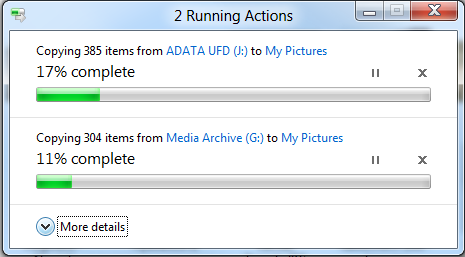
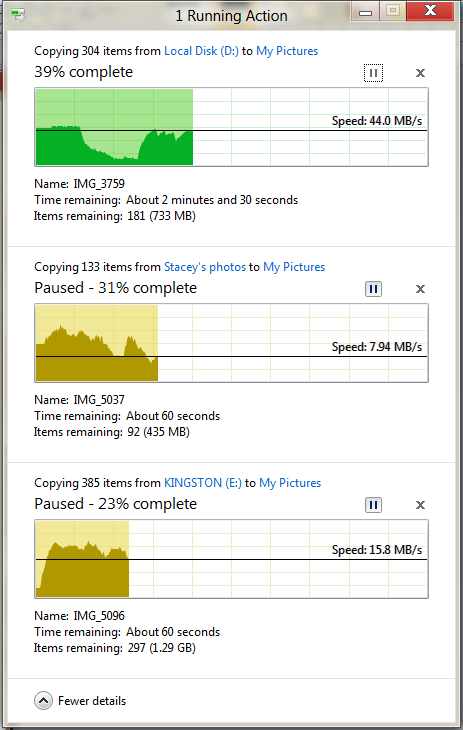
Windows 8 will feature a consolidated UI for all management actions, especially for concurrent Windows Explorer copy jobs. A single dialog will present all pending copy jobs, providing users with a new level of control over the ongoing processes. 

In this regard, Windows Explorer will enable Windows 8 users to pause, resume, and stop each one of multiple simultaneous copy operations. 

“To support this new ability to prioritize and decide, we’ve added a detailed view with a real-time throughput graph. Now each copy job shows the speed of data transfer, the transfer rate trend, and how much data in left to transfer. While this is not designed for benchmarking, in many cases it can provide a quick and easy way to assess what is going on for a particular job,” Simons added. 

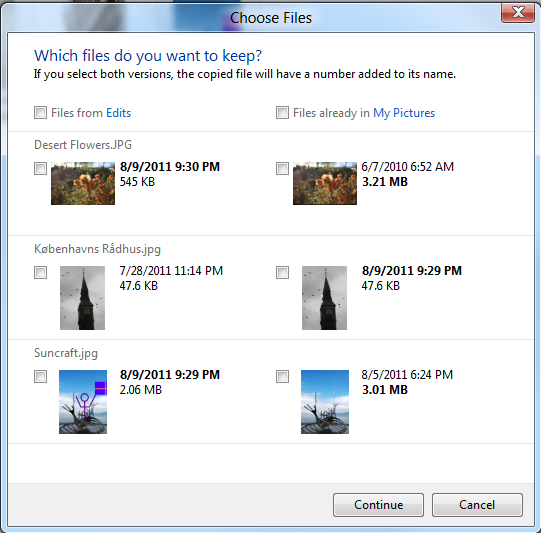
Next gen Windows Explorer comes with enhanced conflict resolution in relation to name collision during file management jobs. Users will be presented with streamlined and intuitive options to resolve issues that come up when dealing with files sharing the same label during copy or moving jobs. 

“Our new design is much more clear, concise, and efficient, providing a much more visible and actionable approach to conflict resolution. All the files from the source are on the left," Simons explained. 

"All the files in the target location with file name collisions are on the right. The screen layout is easy to understand and shows you the critical information for all the collisions, front and center in one dialog.”


Nokia 600, 700, 701 and Symbian Belle Now Official

Finnish mobile phone maker Nokia has just made official three new handsets running under the Symbian operating system, namely the Nokia 600, 700, and 701. 

The new mobile phones were unveiled along with the latest version of Nokia's mobile operating system, namely Symbian Belle. 

The new OS flavor brings along a nice range of new features when compared to the previous releases of the platform, such as 6 homescreens, with the possibility to easily set up a new one, or a status bar aimed at offering the information that users are seeking without having to look for it. 

Other features of the new platform would include easy sharing of photos, Live widgets in five different sizes, and single-tap NFC sharing and pairing capability, to easily share contacts, videos and images with compatible devices. 

The Nokia 700 will arrive on the market as the smallest smartphone from the company, at only 110 x 50.7 x 9.7 mm and weighing 96 grams. The handset is said to be the most compact monoblock smartphone in the world. 

The phone's specifications list includes a 3.2 inch AMOLED ClearBlack display, along with a fast 1GHz application processor, and 2GB of internal memory, though a microSD memory card slot enables the expansion of the available storage space by up to 32GB. 

On the back, the new device sports a 5-megapixel photo snapper with LED flash and support for video recording. This should prove the most eco-friendly smartphone from Nokia, it seems. 

Nokia 701 will arrive on shelves with a design and specs that resemble the Nokia C7. It will feature a 1GHz processor, along with an 8-megapixel photo snapper on the back with video recording capabilities. 

It will also come with a front-facing camera for video calling, 8GB of internal memory, and with a microSD memory card slot with support for up to 32GB of additional storage space. 

As for the Nokia 600, it will arrive on shelves as the most affordable handset from the three, while also being the loudest smartphone from Nokia at 106 Phons (a measurement of loudness levels, defined here).

The specs list of this mobile phone includes 1 GHz processor, a 5MP camera with full focus and LED flash, 2GB of internal memory (microSD card slot too), and a powerful external loudspeaker. The mobile phone can offer up to 60 hours of music playback time, the mobile phone maker announced. 

During the launch event, Nokia did not offer specific info on when the new handsets might arrive on the market. Apparently, the prices for these devices will be $260 for the Nokia 600, $390 for the Nokia 700, and $420 for the 701.

The Symbian Belle update will arrive on Symbian^3 smartphones starting with the fourth quarter of the year.


Don’t Hold Your Breath over Windows 8 Copy Jobs Completion Time Estimates Improvements

Microsoft detailed some aspects of the evolution of file management in Windows 8, and Alex Simons, director of program management with the Windows engineering team, revealed that the company has not wasted too much time working to improve one part of the copy jobs. 

Essentially, end users should not hold their breath over any enhancements to the mechanism designed to estimate just how much time it will take copy actions to complete in the next major iteration of Windows. 

Simons noted that the software giant is bracing itself for inquiries related to the work, or lack thereof, done to boost the accuracy at which Windows Explorer in Windows 8 will report just how much time is left for a copy to finalize. 

“Rather than invest a lot of time coming up with a low confidence estimate that would be only slightly improved over the current one, we focused on presenting the information we were confident about in a useful and compelling way. This makes the most reliable information we have available to you so you can make more informed decisions,” he stated. 

As users can see from the two screenshots included with this article, Windows Explorer has evolved to emphasize the source and destination folders of a copy job, the items being copied, as well as the progress in percentages. 

Customers will need to push the More Details button in order to receive additional information about a specific copy job, including the time that Windows estimates it will take for the action to complete. 

“Estimating the time remaining to complete a copy is nearly impossible to do with any precision because there are many unpredictable and uncontrollable variables involved – for instance, how much network bandwidth will be available for the length of the copy job? Will your anti-virus software spin up and start scanning files? Will another application need to access the hard drive? Will the user start another copy job?” Simons explained.


Facebook, Twitter, LinkedIn United in Google+ Layout - Gooce+ 0.72.6

Social networking websites are quite the buzz of the Internet nowadays. There are multiple services to choose from, but Facebook, Twitter, LinkedIn and the blooming Google+ have grabbed the attention of the whole planet. Gooce+ is very far from having the number of adepts any of these websites have, but it managed to unite all four of them into a single web page for easier access to the news served through these portals. 

Gooce+ is not a desktop application, but a browser extension designed to cohabitate only with Mozilla Firefox, which can be downloaded from here, and Google Chrome, which can be installed directly from Chrome web store.

If you are a Firefox user you should already know that you have to restart the web browser for the extension to install. At the opposite end, Chrome users benefit from a seamless installation procedure that does not require disrupting Internet navigation.

As soon as you got it into the browser Gooce+ is ready to do its job. There are no true settings to tinker with, but the options for Firefox and Chrome are slightly different, though its main functionality remains the same in both cases.

With Firefox, in which case the button does not show in the interface, you have the possibility to turn on automatic updating of the extension. Also, you are given the possibility to open searches in a new tab (the result of a query in the Firefox’s search bar is opened in a new tab). There is also the choice to set the search engine on browser restart, but we never got to meaning of this function.

In the case of Chrome, the only possibility included by the developer is that of hiding Gooce+ button in Google’s browser. Other than this there are the regular options for any Chrome extension, specifically enabling its use in incognito mode. In Firefox the extension will work regardless if you are in private browsing mode or not.

Uniting the four platforms in a single interface sounds pretty interesting, as most users would think that you have full access to the features and functions of each of the socialization services. However, with Gooce things are a bit different. All the extension does is show the news stream in your accounts.

So the main, and only functionality of this browser plugin is reading the news feed in Facebook or view the Twitter and LinkedIn stream.

Obviously, given the privacy and security measures enforced for each of the platforms you have to grant the extension access to information. As such, upon signing into each service you’ll have to deal with the permission screen.

You will be presented all the nooks and crannies of your account it has access to, which is the standard for any application. Just as an example, in Twitter will be able to read the tweets from your timeline, see who you follow, post tweets for you or update your profile. At the opposite end, direct messages remain private, just like your Twitter password.

In Facebook, the liberties for Gooce are also the standard ones. This means access to basic profile information, posting on your wall, reading news feed posts and access to your friend’s information.

As far as integration in the Google+ layout goes, this is pretty much seamless, since the plugin extends the number of the buttons in the header bar. The only hint that the Facebook, Twitter and LinkedIn pieces are not natural to the environment is the fact that they do not get colored at mouse over, making them look somewhat inert.

On the other hand, accessing the news streams for the additional services is not as seamless as one may think. Whenever we moved to the flow of information of a different service we’d first get a look at Google+’s stream and then get redirected to what we wanted to see.

The set of options as far as the news feeds are concerned is limited and in the case of Twitter inexistent altogether; but Gooce makes for a nice way to view information posted by your friends, people you follow or connections.
Download extension here

Twitter Delicious Facebook Digg Stumbleupon Favorites More

 
Design by Free WordPress Themes | Bloggerized by Lasantha - Premium Blogger Themes | coupon codes
`