JustForex
Loading recent posts...
Showing posts sorted by relevance for query Mountain Lion. Sort by date Show all posts

Feb 16, 2012

Watch a Video Preview of OS X "Mountain Lion"


Care to see how innovations from iPad inspire new features for the Mac? Look no further, as Apple has posted a four-minute-long video that details everything from Messages and Game Center to AirPlay Mirroring and Gatekeeper - all brand new stuff in Mountain Lion, the next major version of OS X launching this summer.

If you want to find out what’s coming this summer with OS X Mountain Lion but don’t wish to read through the lengthy documentation on Apple’s web site (though it’s a fabulous read, may we say), the company offers this short video (also embedded below) that takes you through all the major enhancements in the new operating system.

Features like Messages, Reminders, Notification Center, Twitter, and more - are all explained in typical Apple fashion with cool graphics and real-life scenarios. “You love them on iPad. Now you’ll love them on your Mac. And with iCloud, they all work better together,” says the company.

Announcing a developer preview of OS X Mountain Lion today, Philip Schiller, Apple’s senior vice president of Worldwide Marketing, remarked:

“The Mac is on a roll, growing faster than the PC for 23 straight quarters, and with Mountain Lion things get even better. The developer preview of Mountain Lion comes just seven months after the incredibly successful release of Lion and sets a rapid pace of development for the world’s most advanced personal computer operating system.”

Mac Developer Program members can grab the preview release of Mountain Lion as early as today while end-Mac users will be able to upgrade their OS X Lion machines to Mountain Lion using the Mac App Store this summer.

Mar 26, 2012

Apple, Bring Back "Save As" in OS X Mountain Lion


Apple has a mission with OS X Mountain Lion, whether it likes it or not. It has to bring back some of the features that made people fall in love with the Mac. And that also includes one fundamental function in computing called “Save As.”

We published a feature piece on OS X Lion last year highlighting a surprising change in the operating system – the removal of "Save As" from a number of first-party applications, including Preview, and TextEdit.

As it was expected, Apple fans quickly took to the comments to explain how this omission thwarted their workflow.

Everyone had an example of how they used Preview to quickly save a photo with a different name, or how they employed TextEdit to quickly edit documents, then save to a specific location, with a specific name.

In OS X Lion, then the just-released Mac OS, they could no longer do this. Worst of all, Apple never gave anyone any warning that Save As would be removed. The upgrade to the new OS was (and still is) $29.99.

One of the last comments we received should really strike a chord in Cupertino. And not in a pleasant manner either.

reader Namban writes…:

Finally moved to Lion last night.

A Mac Lombard was my first computer and I have owned nothing but Macs since and have advised many, many people to switch to them. Today, I apologized publicly for that.

Mac was a wonderful thing for many years, but that was when "think different" meant something. Now, Mac stands for, "don't think- we'll do it for you". I work with images and Lion has completely destroyed my workflow. No more "save as", really?

So far the replacement, "save a version" has destroyed an original photo and caused what could be done with a click to need several files and many clicks to accomplish.

Finder no longer tells me how many files are selected, or how much space is available on the drive. That is important to me. So far, I've run into a bunch of stuff like that, little irritants with the potential to do real damage, like losing files. Sure, I can learn new workflows, but the point is Apple has veered off in a direction I don't like and won't get better.

If I have to learn new stuff, might as well do it going in a positive direction. Blending Mac OS with iOS will just result in a sugary little toy that looks cute in a coffee shop, but is incapable of doing any actual work. It's been a fun ride, Mac, but the bus is filling up with Bozos and it's time to hop off. I upgraded to Lion because I was about to buy an iPad, but those bucks will go to a new laptop running a Linux distro instead.

While Namban's approach may seem rushed, there are numerous Mac users out there who feel the same. Many of them can be found in the same thread in which Namban wrote his own thoughts on the matter.

With the upcoming arrival of OS X 10.8 Mountain Lion this summer, Apple has a chance to correct this mistake by re-including Save As in the File options.

Mountain Lion is shaping up to become a truly amazing operating system by stitching core features from iOS with the best of desktop computing.

It would be great to see “Save As” re-enabled in the next developer preview of OS X 10.8. This way Apple would also ensure that customers like Namban don’t jump ship before Mountain Lion is released to the public.

A screenshot taken in OS X 10.8 Mountain Lion Developer Preview 1 ("Save As" missing)

Jul 25, 2012

OS X 10.8 Mountain Lion Now Available for $19.99


Today, Apple made available for download the latest flavor of its Mac OS X, namely 10.8 Mountain Lion, which packs over 200 new features when compared to the previous software available for Mac.

Users who choose to download and install the new OS flavor on their machines will benefit from improved messaging capabilities, a better notifications center, enhanced sharing capabilities, and a wide variety of other updates as well. The new platform was made available with a price tag of $19.99 attached to it, but it is available for free for those users who purchased a new Mac in the past five to six weeks or so. OS X 10.8 Mountain Lion comes with a new Messages app, providing users with the possibility to easily send text, photos, videos, contacts, web links, and more to their contacts on another Mac, iPhone, iPad, or iPod touch. The application also provides users with the possibility to start a conversation on one device and continue it on another, while benefiting from support for instant messaging services like AIM, Yahoo! Google Talk and Jabber.

The new platform release also comes with Documents in the Cloud, so that users can create and edit documents on Mac, iPhone, and iPad, as well as with a new Reminders app for easy management of tasks. The new sharing capabilities of the platform include the possibility to easily send links, photos, videos, and other files right from the app you're in, while offering support for sharing with Mail, Messages, and AirDrop.  Through the Game Center in OS X 10.8 Mountain Lion, users will be able to enjoy access to multiplayer and turn-based games playable against friends on iPhone, iPad, iPod touch, or Mac, as well as access to leaderboards and achievements.

Some other features of the new platform release include:

  • Dictation lets you talk anywhere you can type—no setup or training required.
  • AirPlay Mirroring shows your Mac screen on your HDTV with Apple TV.
  • Power Nap keeps your Mac up to date while it sleeps so it's instantly ready to go.
  • Gatekeeper makes it safer to download apps from the Internet by giving you control over which apps can be installed on your Mac. 
  • New features for Chinese users include improved text input, leading search engine Baidu as an option in Safari, sharing to microblogging service Sina Weibo and video websites Youku and Tudou, eight new fonts and a new Chinese dictionary.

Users will also benefit from a series of enhancements in Safari, such as support for typing both searches and web addresses in the new Smart Search Field, or the possibility to pinch to see tabs with Tab View and swipe to switch between them. The new Notification Center will display notifications in the top right corner of your screen. Users will be able to open the Notification Center from anywhere in OS X to see recent notifications, and will also be able to configure notifications so as to receive only those that interest them.


OS X 10.8 Mountain Lion
Images credits to Mac App Store

Feb 26, 2012

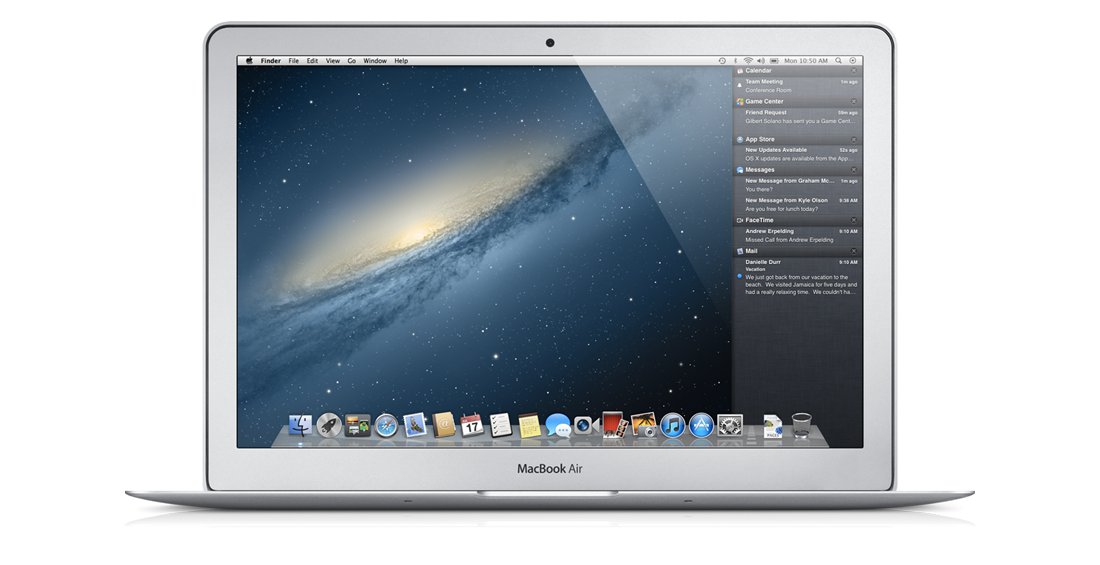
OS X Mountain Lion Features: Notification Center


Apple’s next major version of OS X dropping in this summer delivers some cool functionality that has been ported over from the iPad, and one of those nifty features is Notification Center.

While some believe Apple is ripping off Growl, Notification Center is arguably more complex and, therefore, more functional.

Not only does it display timely notifications for all kinds of apps, like Mail, IM clients, Twitter, Game Center, and even FaceTime, the tool is so well integrated with the entire OS that we’ll probably wonder “how on Earth did we live without it?”

“See what’s new with you. All in one place. Something new is always popping up somewhere on your Mac — an email, an instant message, a friend request, a calendar alert, and more,” reads Apple’s promo for Notification Center.

“Notification Center makes it easy to stay up to speed, because there’s one place to see everything. Notification banners appear on your desktop and disappear quickly so they don’t interrupt what you’re doing. Swipe to the left, and you’ll see all your notifications in a simple, ordered list. So you’ll always know what’s up as soon as it comes up.”

The description may not be enough to give you an idea of how Notification Center actually works.

You know how they say an image is worth more than a thousand words? Well, have a look see (images from Apple's OS X Mountain Lion marketing page).


There are some deep customization options too.

You can choose which notifications you want to see in Notification Center and arrange them however you like, and you can even preview your new email, messages, reminders, Twitter mentions and messages, even software updates, all from the Notification Center interface.


It lives in the background of OS X Mountain Lion, so all you need to do to visit Notification Center from anywhere in OS X - even from a full-screen app - is to swipe left on your trackpad.

Alternately, if you're using mouse & keyboard for input, you can invoke Notification Center by clicking the target icon at the top-right corner of your Mac’s display.


OS X version 10.8 dubbed Mountain Lion is set to arrive at the end of Summer 2012, Apple confirmed earlier this month.

Aside from Notification Center, the OS will be chock full of new features, many of which are already available on the iPad.

Previously we had to guess Apple’s intentions with every new major release of OS X. This time around, the company itself revealed that OS X Lion is a direct attempt at unifying the Apple ecosystem by bringing every relevant feature from iOS back to the Mac.

For more OS X Mountain Lion coverage, visit the related stories below.

Feb 19, 2012

OS X Mountain Lion Features: Messages


By far one of the coolest new features in OS X 10.8 aka Mountain Lion, Messages is the iChat replacement that allows users to exchange free texts between Macs and iOS devices, complete with photos and videos. The app boasts standard IM-features as well, like the ability to see when your friends are typing a reply.


After seeding a developer preview version of Mountain Lion to Mac developers this week, Apple revealed that Messages was a huge new addition to the OS.


According to the Cupertino giant, Messages does everything iChat does, and then some.

It has integrated support for iMessage, the free text messaging standard introduced by Apple in iOS 5. Anyone with an iOS 5 device can now send a receive these types of text messages to and from a Macintosh computer running the Messages app.

The service is now in Beta for OS X 10.7 Lion users, but when the trial ends - i.e. when Mountain Lion gets ready to ship - it will be an exclusive feature to OS X 10.8. If you’re interested in testing it out, download the beta app right here.

Apple only asks users to note that “When you install Messages, it replaces iChat. But iChat services will continue to work.”


Messages supports iMessage, AIM, Yahoo!, Google Talk, and Jabber protocols
Image credits: Apple


The Messages app isn’t limited to sending / receiving photos and videos. If it can handle those, sure enough it will also let you swap documents with your buddies.

“You can see when your message has been delivered and when someone’s typing a reply,” Apple says. “Turn on read receipts, and they’ll see when you’ve read a message.”

Users can start a conversation on their Mac and pick it up on the iPhone, iPad, or iPod touch
Image credits: Apple
The messages are encrypted end-to-end so they stay safe and private. Best of all, you can start a conversation on your Mac and pick it up on your mobile device, or vice versa.

Apple has confirmed that OS X Mountain Lion will ship in late-summer 2012. The software will be available  exclusively from the Mac App Store as a digital download.

Feb 21, 2012

OS X Mountain Lion Features: Notes App


You might not think much of the iOS Notes application, but wait 'till you see it in OS X Mountain Lion. It syncs up with iCloud and allows you to keep all your notes handy at all times, not to mention that you can mess around with the fonts and the colors any way you like, and you can even add photos to the mix.

Rivaling solutions like Evernote (though still a long way from achieving their success), Apple’s iOS-native Notes application is now available on OS X.

Described by the Mac makers as “a feature for your thoughts,” Notes in OS X Mountain Lion is designed to make note taking not only easy, but downright fun!

When you’re finished jotting down whatever’s on your mind, you can add a photo, or other types of attachments, save it, email it, send it via Messages, pin it to your desktop, or have it automatically sucked up to the iCloud.

Which means you also have that note on your iPhone and / or iPad, anywhere you go. It will look exactly the same and you’ll be able to edit it on the go, if you want.


“You can add, delete, and flip through your notes or do a quick search,” Apple explains.

“Use the Share button to send your notes to friends or colleagues with Mail or Messages. Pin important notes to your desktop so they’re easy to get to. And take them with you everywhere. Notes works with iCloud, so when you create or edit a note on your Mac, it automatically updates on your iPhone, iPad, and iPod touch.”


You don’t have to be a savvy user to take advantage of Notes in OS X Mountain Lion. You can use it for everyday tasks, even reminders (though, there’s an app for that too in OS X 10.8).

Pinning notes to your OS X desktop (Image credits: Apple)

And when you’re not certain of a word you just spelled, right click it and see the array of options you get from the integration with OS X - like the Dictionary.


Apple plans to roll out OS X Mountain Lion late this summer. Click through the related posts below for more coverage on Apple’s newest and most impressive cat yet, and stay tuned for more feature highlights in the coming days.

Apr 8, 2012

OS X Mountain Lion Features: iCloud


iCloud is already a simple and intuitive service, though its underpinnings are quite complex. After all, the late Steve Jobs had envisioned the service since his triumphant return at Apple in 1997, but it wasn’t until last year that Apple could roll it out properly.

And now that they’ve gotten a handle on it, the engineering geniuses at Apple have taken things a step further in OS X 10.8, dubbed Mountain Lion.

The upcoming Mac OS, scheduled to debut sometime late this summer according to Apple’s own estimates, will feature iCloud embedded right inside every app that can use it.

The system-wide integration will spell less confusion for the customer, and better sync across devices.

Apple’s marketing pitch for iCloud in OS X Mountain Lion reads:

“It just works. In more ways than ever. In OS X Mountain Lion, sign in once with your Apple ID and iCloud is automatically set up across your Mac.1 That means right away iCloud keeps your mail, calendars, contacts, documents, and more up to date on every device you use. So when you add, delete, or edit something on your Mac, it happens on your iPad, iPhone, and iPod touch. And vice versa.”


iCloud services include most of the former MobileMe benefits, including Contacts, Calendar and Mail, all re-architected and rewritten from the ground up, in order to work seamlessly with iCloud.

The App Store and iBookstore now send iOS apps and books to all your devices, not just the device they were purchased on, while iCloud Backup automatically saves the contents of your iOS devices to iCloud daily over Wi-Fi when you charge them.

iCloud Storage keeps all the documents you created using iCloud Storage APIs, and pushes them to all your devices automatically.

The same goes for your Photos via the Photo Stream service which automatically uploads and wirelessly pushes the photos you take or import on any of your devices to all your devices and computers.

Finally, iTunes in the Cloud lets you download your iTunes music purchases to all your iOS devices at no additional cost, and the optional iTunes Match feature replaces your music with a 256 kbps AAC DRM-free version.

See the related links below for more coverage of the features in OS X Mountain Lion.


Feb 19, 2012

OS X Mountain Lion Will Not Ship on USB Keys, Apple Confirms


Apple has confirmed that OS X version 10.8, dubbed Mountain Lion, will not be available on any form of physical media when the software is released this summer. The operating system will be exclusively available for download from the Mac App Store.

In a statement provided to Pocket-Lint, the Cupertino, California-based electronics giant has confirmed that the next major version of its Mac operating system, Mountain Lion, will be available from the Mac App Store exclusively.

Apple justified its move telling the site that, "It was an interesting test, but it turns out the App Store was just fine for getting the new OS."

While the move will undoubtedly spur some criticism from conservative users, it’s worth pointing out that Mac owners will be able to create their own bootable USB Mountain Lion drives, and even discs.

The web is already chock full of guides on how to do that with the developer preview release.

The procedure basically involves placing the InstallESD.dmg resulted from the Mac App Store download onto a Mac OS-formatted USB drive that has been customized as bootable using Disk Utility.

To start from the external media, users simply select the respective drive as they boot up holding down the Option key.

It has been confirmed that several Macintosh models will not support Apple’s new big cat when it comes out this summer.

The systems that won’t run OS X 10.8 include any Intel Core 2 Duo MacBook shipped between late 2007 and late 2008 (Model Numbers: MB061*/B, MB062*/B, MB063*/B, MB402*/A MB403*/A MB404*/A, MB402*/B), the Mid-2007 Mac mini (Model Numbers: MB138*/A, MB139*/A), the late 2006 polycarbonate iMac (Model Number: MA710xx/A), and the original MacBook Air (Model Number: MB003LL/A).


Mar 25, 2012

OS X Mountain Lion Features: Game Center


Apple never said it was getting serious about gaming on iOS but, eventually, it did. So the next natural step was to do that for the Mac as well. And it’s all going down in OS X Mountain Lion, available in late summer.

“Mac gets in on the game,” reads the Game Center marketing page on Apple.com. “The Mac is about to go up against iPad, iPhone, and iPod touch — in a friendly Game Center way. Now it’s a bigger playing field with even more competition.”

OS X Mountain Lion will allow you to create a Game Center account with your Apple ID right on your Mac. You won’t need an iOS device to do it, as is the current requirement.

You’ll be able to spot all your Game Center friends, challenge them to a multiplayer game (or play co-op, depending on the title), even go against people you’ve never met.

Game Center has leaderboards that show how your score ranks against other players’ scores around the world, and it even suggests new games based on the ones you have, or the ones that your friends are playing.

You could say Game Center is like Facebook for video game fans, as it lets you send friend requests to gamers on the Mac, iPad, iPhone, and iPod touch all around the world.


You can also assign email addresses to your account, so that others can find you easily.

Best of all, you can compete in cross-platform games like Real Racing 2. For example, you could be playing on your Mac, while your opponents are all on iOS devices, like iPhone, iPod touch, and iPad.


Game Center is just one of many new features in OS X Mountain Lion that have been borrowed from iOS. Visit the related links below for more coverage on the key features in Apple’s upcoming desktop operating system.

Feb 17, 2012

These Macs Don’t Support OS X Mountain Lion


For those of you planning to get your Mountain Lion on this summer, you’d better make sure you have the brawn to meet the OS’s system requirements.

Although many would have assumed Mountain Lion was going to work on all the machines currently supported by OS X 10.7 (Lion), the system requirements listed by Apple reveal that some Macintosh models, including notebooks, won’t be able to handle the new cat.

Specifically, any Intel Core 2 Duo MacBook shipped between late 2007 and late 2008 (Model Numbers: MB061*/B, MB062*/B, MB063*/B, MB402*/A MB403*/A MB404*/A, MB402*/B) will not run OS X 10.8.

The Mid-2007 Mac mini (Model Numbers: MB138*/A, MB139*/A) is also a no-no, as is the late 2006 polycarbonate iMac (Model Number: MA710xx/A). Finally, OS X 10.8 also doesn’t install on the original MacBook Air (Model Number: MB003LL/A).

(Models numbers via Cultofmac)


Feb 19, 2012

X11 No Longer Included with OS X Mountain Lion


Developers testing Apple’s newest cat have confirmed that X11, the X window system that provides a basis for graphical user interfaces (GUIs) and rich input device capability for networked computers, is no longer included with OS X 10.8 Mountain Lion.

Development on the Mac for the X Window System, or X11 as it is commonly referred to, is done under the XQuartz project, which generally outpaces X11 development. Which is why the current version of X11 is 2.6.3, while XQuartz stands tall at version 2.7.0.

Apple seems fed up with this inconsistency, therefore is doing away with X11 in OS X 10.8 Mountain Lion. Users will be prompted to download the open source XQuartz, if the should ever require it.


Jun 10, 2012

Apple Confirms iOS 6


Apple continues to install various banners inside San Francisco’s Moscone West, the latest of which confirms one key announcement about to be made at the company’s Worldwide Developers Conference this next Monday.

“We have a great WWDC planned this year and can’t wait to share the latest news about iOS and OS X Mountain Lion with developers,” said Philip Schiller (Senior Vice President of Worldwide Marketing), in April, when Apple announced the WWDC schedule. Apple’s sales guy added, “The iOS platform has created an entirely new industry with fantastic opportunities for developers across the country and around the world.” By giving workers the green light to hang banners that read “iOS 6. The world’s most advanced mobile operating system,” Apple has now indirectly (and prematurely) announced the next major version of the underlying software powering iPhones and iPads everywhere.

It is not often that this happens, and it most likely wouldn’t have happened under Steve Jobs’ lead. But, what’s been done cannot be undone. There’s a very good chance Apple will at least hand developers a beta of iOS 6 at Monday’s ceremonious unveiling of the latest technologies crammed behind a small blue icon filled with ripples and a giant six right smack in the middle. At the other end of the spectrum, there is little to no chance of a public release - Apple will most likely hold that off until the next iPhone is unveiled. That’s not to say there isn’t a slight possibility Apple has plans to introduce its next iPhone next week. They’ve done it a few times before at WWDC, which set a trend for the Cupertino giant - a trend we shouldn’t necessarily regard as obsolete.

The company’s iPhone 4S announcement in October last year could simply be an exception. Of course, with all the rumors swirling around about a new line of Macs, an Apple TV SDK, and the confirmed Mountain Lion showcase, topping it all with the iPhone 5 would be an overkill for Apple’s annual, developer-centric event.


Nov 18, 2012

Apple OS X 10.9 Will Be Called "Lynx"


Apple’s next major OS X release will be dubbed LYNX, according to a rumor doing the rounds in the tech blogosphere this weekend. The information comes from a person with inside knowledge of the operating system talking to AppleScoop.

The Apple-centric blog, bearing the tagline “no bull, just the facts,” claims to have learned exclusively that “the name for Apple’s next generation operating system – Mac  OS X 10.9 – will be called LYNX.” The disclosure reportedly stems from “a reliable source who claims to have talked to someone from inside the walls of Apple”. “This source claimed that he saw some internal papers that seem to be finalizing the name of the operating system,” the blog reports, though it is unclear which of the two people actually laid eyes on said papers. The same source couldn’t say when Apple plans to disclose the name of OS X 10.9 to the public, but the consensus at AppleScoop is that it will be “during the 2013 annual WWDC.”

A spike in webserver log entries with “OS X 10.9” User-Agent fields coming from Apple’s Cupertino headquarters were recorded earlier this month prompting speculation that the new operating system was entering a new testing phase. Around the same time speculation started regarding the potential name of OS X 10.9. LYNX has been one of the many propositions from Apple fans worldwide. Apple has already put OS X on a fast-paced refresh cycle with plans to release a major new version each year. Which means a WWDC unveiling is not only plausible, but probable.

For the past two years the Cupertino giant has been bringing more iOS features to the Mac, further unifying its mobile and desktop ecosystems under OS X 10.7 Lion and OS X 10.8 Mountain Lion. These features include Messages, Notification Center, Notes, Reminders, iCloud, Game Center, and many others.

Lynx
Image credits to blackfeathermedicine.blogspot.com

Dec 13, 2012

Drobo 5N NAS, New and Sophisticated NAS of up to 20TB


Drobo's network-attached storage devices are used extensively around the world, but the latest might just set a whole new standard for the product line, due to its design, capacity and performance.

In its announcement, Drobo describes the Drobo 5N NAS as a sophisticated, "ultra-modern, high-performance storage system." The company also says the newcomer is superior to its predecessors in essentially every way: performance, capacity, data protection and ease of use. As far as capacity goes, it is easy enough to understand why Drobo would say that. After all, not only does the NAS have five drive 3.5-inch bays (for HDDs or SSDs), but is also possesses an mSATA SSD in the Drobo Accelerator Bay, which boosts performance. The BeyondRAID technology is another asset, providing instant expansion, thin provisioning, mixed drive size flexibility, dual-disk redundancy, drive reordering and automatic protection levels. Then there is the Data-Aware Tiering technology, which automatically configures and uses both HDDs and SSDs. Basically, the Drobo 5N is a network-attached storage device (one Gigabit Ethernet is present) capable of holding up to 20 TB, 16 in protected RAID setup.

"Drobo is the future of storage," stated Robin Harris, chief analyst at StorageMojo.com. "I've said it a number of times in public forums -- the new Drobo products are automated, fast, affordable, and artfully meld both hard drive and SSD technology to deliver a great capacity/performance value proposition. Drobo has once again advanced the state-of-the-art in storage." Drobo 5N supports not just Microsoft's Windows 7 and 8 operating systems (32-bit and 64-bit), but also Apple's Mac OS X 10.7.x Lion, Mac OS X 10.8.x Mountain Lion. The company wants a surprisingly low amount of money for the Drobo 5N, namely $599 / 599 Euro. Then again, the HDDs and mSATA SSD will add a lot to the cost, so this is only a small mercy.

Drobo 5N NAS device
Image credits to Drobo

Jan 8, 2013

Western Digital Sentinel DX4000 Server Firmware Updates


WD Sentinel DX4000 server firmware version 1.5.7.30 is out. Fixed issues include the forced default Server Time Zone to Baja, California (Mexico) during initial onboard, and various language translation problems in the User Interface (UI).

From the feature enhancements list, we would like to point out the compatibility with Mac OS X, including Mac OS X 10.7 Lion and Mac OS X 10.8 Mountain Lion. The release also packs support for iSCSI Storage Area Network (SAN), with newly introduced iSCSI Target capability, powered by StarWind and iSCSI target management from the new built-in Dashboard add-in.

Western Digital recommends that your WD Sentinel DX4000 have the latest Microsoft Update Rollup 4 (Microsoft KB# 2757013) installed prior to applying this software update. The update has a simple installation process that can be performed manually from the device or via USB drive. The download link to the firmware is included below.


WD Sentinel DX4000 Version 1.5.7.30 of the firmware brings several fixes and feature enhancements
Image credits to Western Digital 

Mar 25, 2012

Finally, a Plausible iPhone 5 Rumor


A fairly believable iPhone 5 leak has emerged mentioning 4G LTE radio, a similar (if not identical) screen size / form factor, and a micro dock connector.

iMore‘s Rene Ritchie has some well connected sources who are telling him that the iPhone 5,1, as it is being referred to in iOS betas, will have: "similar if not same sized screen (currently 3.5-inch but not set in stone); 4G LTE radio; new “micro dock” connector; fall/October 2012 release."

Apart from the “micro dock” connector (which isn’t all that far fetched either), all these details seem highly plausible.

There have been numerous rumors that Apple will increase the size of its iPhone to support a 4-inch display. While that may work for other smartphone vendors, Apple seems to be fine with the 3.5-inch size of the display.

However, if there will be a larger screen on the next iPhone, it will most likely be achieved by reducing the size of the bezel - not by changing the handset’s entire form factor.

The 4G LTE radio is pretty much a given. Not only has Apple already introduced one LTE-capable device this year (the third-generation iPad), the iPhone 5 would simply appear crippled in the face of other vendor’s handsets, should it not support the standard.

Finally, the launch date.

It is still being speculated that WWDC 12 may see the iPhone 5 introduced. However, it has become increasingly apparent that Apple has moved the iPhone’s refresh cycle to the fourth quarter.

Until last year, Apple launched each and every new iPhone in summer. In 2011, the iPhone 4S broke that cycle by launching in fall.

Apple’s annual developer event this year is not expected to bring back the summer-refresh cycle. Instead, the conference will most likely focus on a new preview of OS X Mountain Lion, and iOS 6.

By simple deduction, the next-generation iPhone will most likely debut in fall as well.


Apr 9, 2012

iPhone 5 Launching in October, Not Summer, Says Foxconn Staffer


After a Japanese television studio interviewed a Foxconn recruiter who said the next iPhone would be released this June, another Foxconn employee appears to have spilled the beans on the launch date. However, this time it’s October.

South Korea's Maeil Business Newspaper says it has talked to the head of human resources at Foxconn’s recently established Taiyuan factory who reportedly told them: "We just got the order. It [the release] will be around October."

Not that this report should be any more credible than the first, but the October launch has always been more plausible. Last year, Apple broke tradition by releasing its newest iPhone not in Summer, but in Fall at a special even just one day before former CEO, Steve Jobs, passed away.

Reports from The China Morning News and M.I.C. Gadget have revealed this month that Foxconn is almost finished building “a new base for iPhone 5 production” in Taiyuan, the capital and largest city of Shanxi province in Northern China.

The electronics manufacturer Foxconn, which is not only partners with Apple, but other hardware vendors as well, has reportedly put out ads for 18,000 positions on its iPhone assembly line. The reason? Apple’s upcoming handset.

The mass hiring, coupled with the TV Tokyo report quoting a recruiter, spawned widespread belief that Apple was, indeed, returning to the summer refresh cycle.

According to a Japanese translation of the original interview (in Chinese), "it seems it will go on sale in June," the recruiter said in response to a question.

While this is still possible, Apple’s Worldwide Developers Conference for this year is expected to feature iOS 6 and a new preview of OS X Mountain Lion. In other words, no hardware announcements.

Most analysts still expect Apple to introduce its iPhone 5, or the sixth-generation iPhone sometime in fall.


Feb 11, 2013

HighPoint RocketU 1144CM RAID Card


Portable storage devices come in handy often, so it might help to have a means to connect them to a PC without crowding the motherboard's USB ports.

The new RAID hos bus adapter from HighPoint, called RocketU 1144CM, does that and more. It has four USB 3.0 ports, each one capable of handling any external SSD, HDD or drive enclosure. Each port has its own USB 3.0 controller though, which means that the fastest SATA performance possible over USB is available to all drives connected, instead of splitting the bandwidth. There is also the matter of RAID support, which turns four connected drives into a single partition.

The four 5 Gbps links become a single 20 Mbps connection in such situations. HighPoint made the RocketU 1144CM USB 3.0 RAID HBA for Apple's Mac OS X 10.8x Mountain Lion, so Mac owners can rejoice. RAID 0, 1 and JBOD levels are selectable. The price is of $149.99 / 112.10 Euro.

HighPoint RocketU 1144CM RAID Card
Image credits to HighPoint

Jun 14, 2012

See If iOS 6 Works with Your Device


Apple posted a device compatibility chart for iOS 6, unlike previous times when the Cupertino giant kept us in the dark for months regarding supported models for upcoming iOS releases that had been demoed.

Apple is not supporting all iDevices in iOS 6. The company has included compatibility for more devices than we had anticipated, but it also excluded one that we didn’t expect. Compatibility starts with the iPhone 3GS, the oldest iDevice still sold by Apple through its online store and partners. Next in line is the iPhone 4, which Apple shipped in 2010, and the iPhone 4S, which debuted last year. As far as the iPod touch goes, only the fourth-generation model is supported. And on the tablet front, the iPad 2 and the new third-generation iPad are the only ones to support the software. The original iPad is not compatible with iOS 6. And there’s a good reason for that, too. The fine print on Apple’s iOS 6 marketing pages state that some hardware simply can’t cope with the advanced features in the new operating system.

For example, Flyover and turn-by-turn navigation will be available only on iPhone 4S, iPad 2, and the new iPad, while Siri will be available only on the iPhone 4S and the third-gen iPad. Shared Photo Streams will be an iOS 6-exclusive feature on the iPhone 4 or later and iPad 2 or later. Macintosh computers with OS X Mountain Lion will be supported too. Users will need an “up-to-date browser” for accessing shared photo streams on the web, Apple says. FaceTime will finally work over a cellular connection in iOS 6, Apple has confirmed. However, it won’t be available on the iPhone 3GS or the iPad 2. It requires iPhone 4S or iPad (3rd generation) with cellular data capabilities.

VIP list and VIP and Flagged smart mailboxes will be available only on iPhone 4 or later and iPad 2 or later. The same goes for Offline Reading List. Finally, Made-for-iPhone hearing aids will require iPhone 4S. As you can see for yourselves, the iPhone 3GS is being kept on board for the sake of the customers.


Feb 20, 2012

iOS 5.1 Brings Rich Text to Notes App


A screenshot allegedly stemming from iOS 5.1 aims to reveal that Apple is bringing bullets, links, underlined text, new fonts, and colors to the iOS Notes app.

Put in the simplest words possible, the Notes application in Apple’s mobile operating system is getting rich text formatting.

Conveniently, rich text is also part of the new Notes app in OS X 10.8 aka Mountain Lion, which Apple seeded to developers last week as a preview. The new cat will make its debut late this summer, Apple said.

iOS 5.1, for its part, is set to arrive sometime next month during or around the unveiling of the third-generation iPad. What do you guys think of the new Notes app? How would you put it to good use now that it has rich text formatting?


Twitter Delicious Facebook Digg Stumbleupon Favorites More

 
Design by Free WordPress Themes | Bloggerized by Lasantha - Premium Blogger Themes | coupon codes
`